1. Requirements
2. Install Software
In this section we will install some stuff which will make life easier. In constrast to Spark or Hadoop it is only required to install the stuff on the mainnode and not at all cluster nodes.
2.1 Install Ipython
As orangepi user install ipython with sudo apt-get update and sudo apt-get install ipython ipython-notebook. To be able to create nice plots we will also install matplotlib via sudo apt-get install python-matplotlib.Switch to the hduser and make a new ipython user with ipython profile create pyuser open the config file nano /home/hduser/.ipython/profile_pyuser/ipython_config.py and add \\
c = get_config()\
c.NotebookApp.ip = '*'\
c.NotebookApp.open_browser = False\
c.IPKernelApp.pylab = 'inline'\
establish the connection to Spark at startup with nano /home/hduser/.ipython/profile_pyuser/startup/00-pyuser-setup.py and add\
\\
import os\
import sys\
sys.path.insert(0, '/opt/spark-2.1.0-bin-hadoop2.7/python')\
sys.path.insert(0, '/opt/spark-2.1.0-bin-hadoop2.7/python/lib/py4j-0.10.4-src.zip')\
execfile('/opt/spark-2.1.0-bin-hadoop2.7/python/pyspark/shell.py')\
To start the ipython notebook execute ipython notebook --profile=pyuser. You can now access the notebook with http://192.168.1.101:8888.
2.2 Install Hive
To install Hive we first need to download the package as orangepi user in the /opt/ directory with \(HADOOP_HOME/bin/hadoop fs -chmod g+w /user/hive/warehouse. In the next step we have to create the metastore with schematool -initSchema -dbType derby. Finally we need to make sudo cp hive-default.xml.template hive-default.xml and make some changes such as replacing\) (look here for the latest release). As usual we extract the file with sudo tar -xvzf hive-2.1.1/apache-hive-2.1.1-bin.tar.gz and change the permissions with sudo chown -R hduser:hadoop apache-hive-2.1.1-bin/. To set the enviroment variables switch to the hduser and open nano ~/.bashrc, then add\
\.\
export HIVE_HOME=/opt/apache-hive-2.1.1-bin\
export PATH=[...The other Path variables...]:$HIVE_HOME/bin\
Got to cd $HIVE_HOME/conf and rename as orangepi user the config file sudo cp hive-env.sh.template hive-env.sh and insert sudo nano hive-env.shthe location of hadoop export HADOOP_HOME=/opt/hadoop-2.7.3. Finally we need to to create the /tmp folder and a separate Hive folder in HDFS with \. In the next step we have to create the metastore with
$HADOOP_HOME/bin/hadoop fs -mkdir /tmp\
$HADOOP_HOME/bin/hadoop fs -mkdir /user\
$HADOOP_HOME/bin/hadoop fs -mkdir /user/hive\
$HADOOP_HOME/bin/hadoop fs -mkdir /user/hive/warehouse\
$HADOOP_HOME/bin/hadoop fs -chmod g+w /tmp\
\(HADOOP_HOME/bin/hadoop fs -chmod g+w /user/hive/warehouseschematool -initSchema -dbType derby. Finally we need to make sudo cp hive-default.xml.template hive-default.xml and make some changes such as replacing\){system:java.io.tmpdir} with $HIVE_HOME/iotmp such that it looks like this (hint: use STRG+W to find the locations)\
hive.exec.local.scratchdir\
$HIVE_HOME/iotmp\
Local scratch space for Hive jobs\
hive.querylog.location\
$HIVE_HOME/iotmp\
Location of Hive run time structured log file\
hive.downloaded.resources.dir\
$HIVE_HOME/iotmp\
Temporary local directory for added resources in the remote file system.\
\
That’s it Hive should now be installed, we can now chekc the installation with \
cd $HIVE_HOME\
bin/hive.
3.4 Connect Ipython and Hive
To connect Ipyhton and hive as orangepi we fist neeed to install the python package manager p ip with sudo apt-get install python-pip python-dev build-essential. Then \ and in $HADOOP_HOME/etc/hadoop/ we have to in core-site.xml we have to add `hadoop.proxyuser.hduser.hosts\
sudo apt-get install libsasl2-dev\
sudo pip install --upgrade pip\
sudo pip install --upgrade virtualenv\
sudo pip install sasl\
sudo pip install thrift\
sudo pip install thrift-sasl\
sudo pip install PyHive\
*
hadoop.proxyuser.hduser.groups\
*`
3 Initiate the Cluster at Startup
Switch to su orangepi user and edit sudo nano /etc/rc.local and instert\
\ before exit 0.
su - hduser -c "ipython notebook --profile=pyuser &"\
su - hduser -c "/opt/hadoop-2.7.3/sbin/start-dfs.sh &"\
su - hduser -c "/opt/spark-2.1.0-bin-hadoop2.7/sbin/start-all.sh &"\
su - hduser -c "/opt/apache-hive-2.1.1-bin/bin/hiveserver2 &"\
4. Put everythin in a nice case
Finally we put everything into a nice case, ensure the power suppy and attach everything to a switch using the following parts:
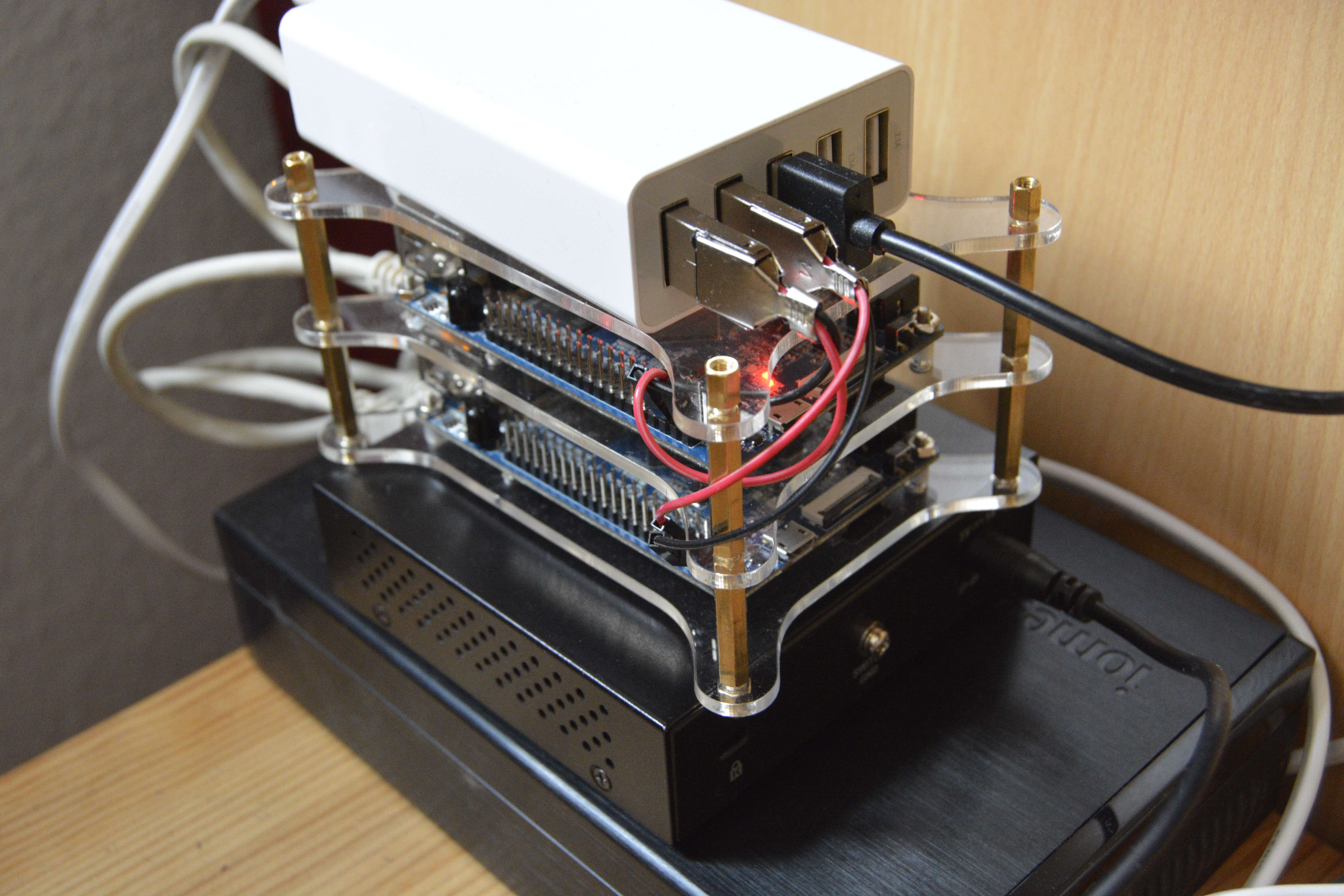
The final mini cluster.
Pingback: 3. Build the Cluster – The Big Data Blog